![logo-green.png]](https://www.help.archer.re/hs-fs/hubfs/logo-green.png?height=40&name=logo-green.png)
Every estimate in Archer carries a Data Source level. The level describes what data built the number and how much of it is yours. It is not a grade.
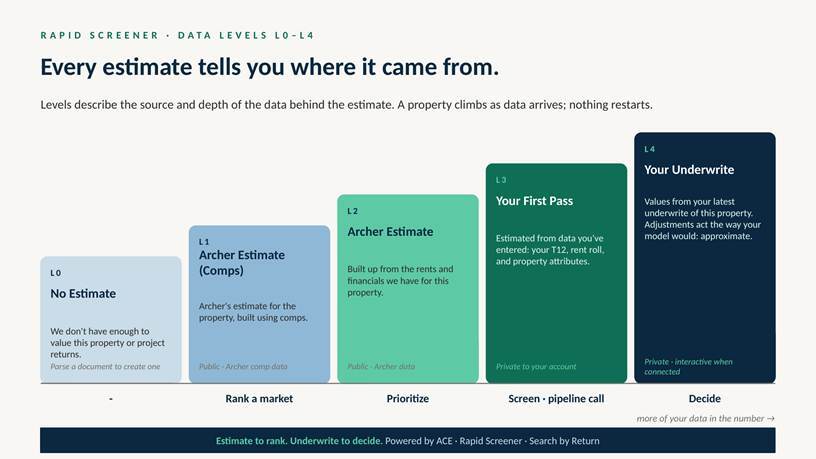
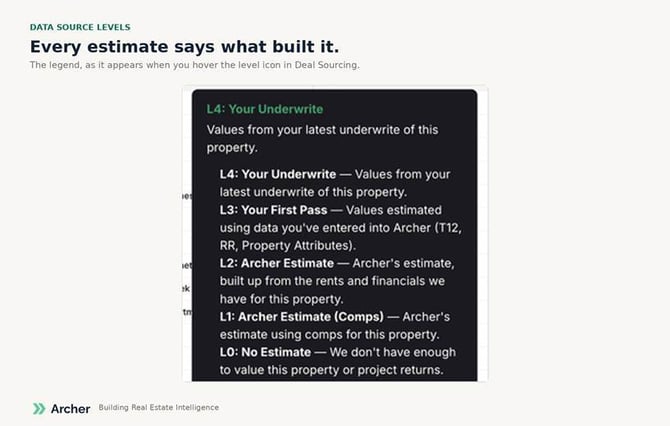
L0 · No Estimate. We don’t have enough to value this property or project returns. Parse a rent roll or T12 to create one.
L1 · Archer Estimate (Comps). Archer’s estimate for the property, built using comparable properties: rent and expense comps, county records, sale records. No operating data on the property itself.
L2 · Archer Estimate. Archer’s estimate built up from the rents and financials we hold on this property, with comps filling gaps.
L3 · Your First Pass. Values estimated using data you’ve entered into Archer: a T12, a rent roll, or property attributes. Correcting a single attribute, such as unit count or class, is enough to move a property to Level 3. Private to your account.
L4 · Your Underwrite. Values from your latest saved underwrite of the property. Private to your account.
How a property moves up: upload a rent roll or T12 (L1/L2 → L3); correct an attribute on the property page (→ L3); run and save an underwrite (→ L4). Nothing restarts; each level replaces the one below it.
Where you’ll see it: the signal-bar icon next to any estimate, the Data Source column in Deal Sourcing, and the header of the Rapid Screener. Filter Deal Sourcing by level to rank only on the estimates you want.