![logo-green.png]](https://www.help.archer.re/hs-fs/hubfs/logo-green.png?height=40&name=logo-green.png)
Overview
Full list of what Archer handles automatically — time period identification, subtotal row detection, COA mapping, header/double-count prevention, sign shifting, NOI validation, and comp benchmarking.
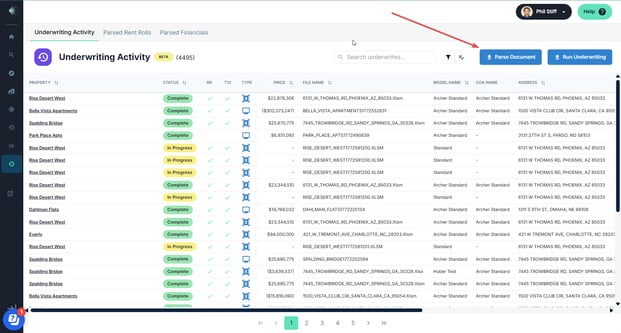
How to access Parse Document
Parse Document button lives on both the All Activity page (top right of any tab) and the property page header. Two screenshot placeholders for each location.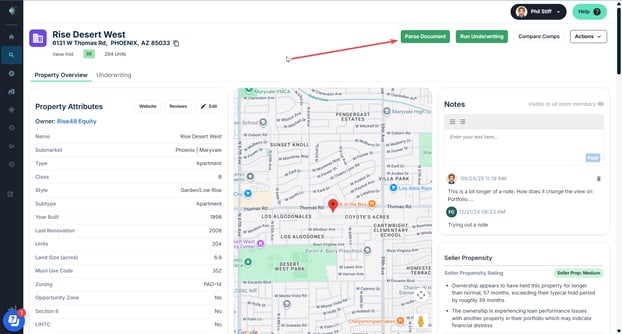
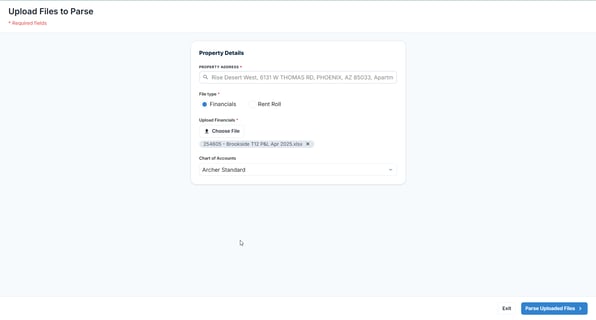
Step 1: Upload Files to Parse
Property Address + File type: Financials + Upload T12. That's it — simpler than the RR modal, no Rent Roll Type selector or PLRR option.
💡 Non-standard layouts, merged cells, and formatted headers are all fine — Archer handles them in Step 2.
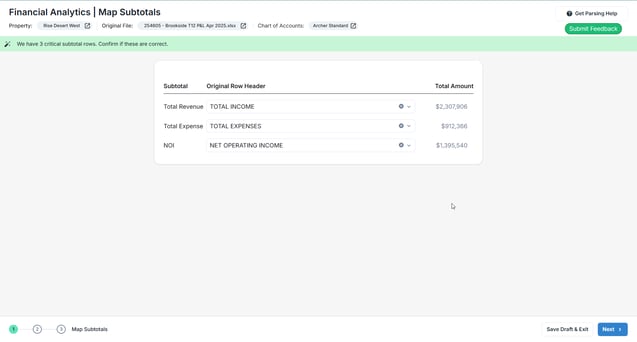
Step 2: Map Financial Subtotals
Archer proposes Total Revenue, Total Expense, and NOI rows. You confirm or correct each using the dropdown. Warning shown if any can't be located or don't reconcile. These benchmarks drive the NOI variance check in Step 3.
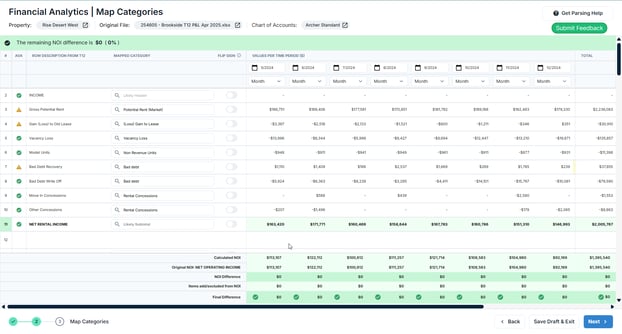
Step 3: Map Financial Categories
Full line item table with Mapped Category dropdowns, Flip Sign toggle, and Header marking. NOI Variance section at the bottom shows Calculated NOI, Original NOI, NOI Difference (✓ or ⚠), and Items Added/Excluded. Note that a non-zero Final Difference may be intentional COA reclassification, not an error.
Step 4: Review Financial Analytics
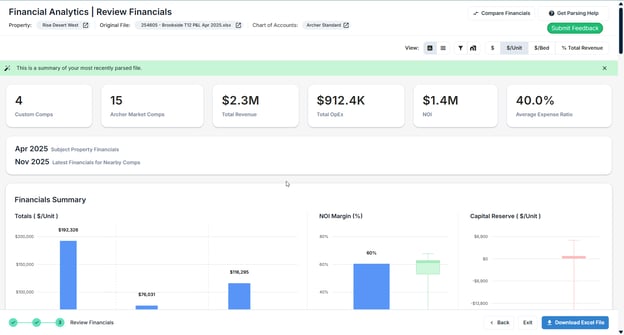
Full comp-benchmarked analytics — Total Revenue, OpEx, NOI, Expense Ratio, Financials Summary charts (Totals, NOI Margin, Capital Reserve), Revenue Items with T12/T6/T3 toggles. View toggles: $, $/Unit, $/Bed, % Total Revenue. Scaled by Totals or per Line Item.
Your financial comps are displayed at the granularity of your Chart of Accounts. Because Archer mapped every line item to your COA categories in the previous step, the analytics and benchmarking you see here reflect your own category structure — not a generic financial breakdown. This means you're comparing your property against market comps at the same level of detail you underwrite at.
Exit: Download Excel File