![logo-green.png]](https://www.help.archer.re/hs-fs/hubfs/logo-green.png?height=40&name=logo-green.png)
Overview
When underwriting with multiple years of financial history — YTD plus 2024, 2023, 2022 — upload all your files at once in the Run Underwrite modal. Archer walks you through each document in sequence, carries your mapping corrections forward, and delivers the full stitched history into your Excel model in a single pass.
Note: Multi-document upload is currently available in the full Run Underwrite flow. Standalone Parse Document support is coming soon.
Step 1: Upload your T12 documents
Attach all T12 files at once under the Financials field in the Run Underwrite modal. Archer processes all documents simultaneously in the background — by the time you finish reviewing the first, the others are already parsed and waiting.
💡 Tip: Upload most recent first — Archer reviews them in the sequence they were uploaded.
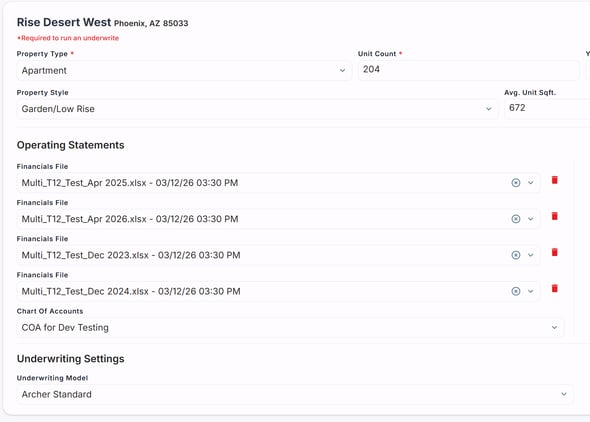
Step 2: Review each document in sequence
Archer walks you through Map Financial Subtotals, Map Financial Categories, and NOI reconciliation for each document one at a time, Rent Roll first if included.
Mapping corrections carry forward. Corrections made on document one are stored and applied automatically to the same lines in subsequent documents. Archer notifies you: "We're applying your adjustments from the prior document — proceed to continue."
Two exceptions that don't carry forward: subtotal/ignore flags, and lines Archer itself identifies as subtotals.
Step 3: Review the stitched financial history
After all documents are reviewed, Archer stitches the parsed periods into a single continuous financial history, visible in the table view before the underwrite is generated. If documents overlap in date range, Archer defaults to the later file for the overlapping period automatically.
What shows in analytics vs. your Excel model
In-app analytics — most recent 12 months only. Benchmarking older periods against today's comps isn't meaningful, so the view stays focused on current performance.
Table view + Excel financials tab — full stitched multi-year history, pushed in one pass. This is what feeds your model.
Parsing additional documents for deals already in progress
Already have an underwrite built? Parse additional historical T12s through the web app without generating a new underwrite, then use Refresh in the Excel Add-in to pull the extended history into your existing model.