![logo-green.png]](https://www.help.archer.re/hs-fs/hubfs/logo-green.png?height=40&name=logo-green.png)
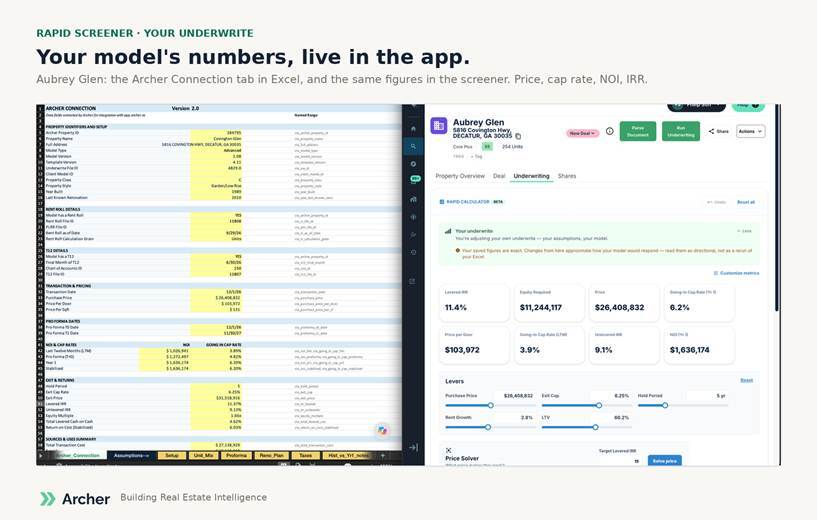
How can the screener represent my Excel? We don’t recalculate your model. Your saved numbers are shown as your Excel produced them. When you move a lever, we use what we’ve learned about how your model behaves from the Archer Connection tab to estimate how the number moves. Exact on the saved figures, approximate on the moves.
Why does the adjusted number differ slightly from Excel? Adjustments are inferred, not recalculated. Compounding changes (hold period, adding a renovation) are roughest.
The NOI is wrong. Can I fix it? Not yet in the screener. Upload a T12 or correct the attributes on the property page and the estimate re-runs from your data. Editing an estimate directly is coming.
I changed the price and it didn’t keep. Adjustments are session-only in the beta, with Undo. Saving back to your pipeline is next.
I filtered by return and some of these aren’t real. Check the level. A Level 1 estimate is built from comps alone and can be well off on a property with missing attributes. Correct the unit count or class, or add financials, and it re-estimates.
Does it use my comps? Levels 1 and 2 use Archer’s data. Your comps and assumptions flow through your underwrite at Level 4.
A deal was shared with me. Where’s the screener? Add it to your pipeline or run an underwrite. Then it’s there.
Why “beta”? We’ll be tuning estimates and behavior for a while, and we want your pushback while we do.