![logo-green.png]](https://www.help.archer.re/hs-fs/hubfs/logo-green.png?height=40&name=logo-green.png)
In Archer, your underwriting model and your chart of accounts are a matched pair. Every line in the chart is wired to a specific cell in Excel. Change the chart and the model has to change with it — which makes now, before we build, the cheapest moment to decide how detailed that chart should be.
There are four legitimate structures. All of them work. They trade off across four things: how fast your screening stays, how faithfully a property manager's budget lands, how much build effort is involved, and how much friction you carry on every deal afterward.
Naming is free in all four. If your PM calls it Market Rent, your chart can say Market Rent. Renaming is independent of this decision. The only thing these options differ on is depth — how many separate buckets the system sorts each statement into. Don't pay for depth to get naming.
At a glance
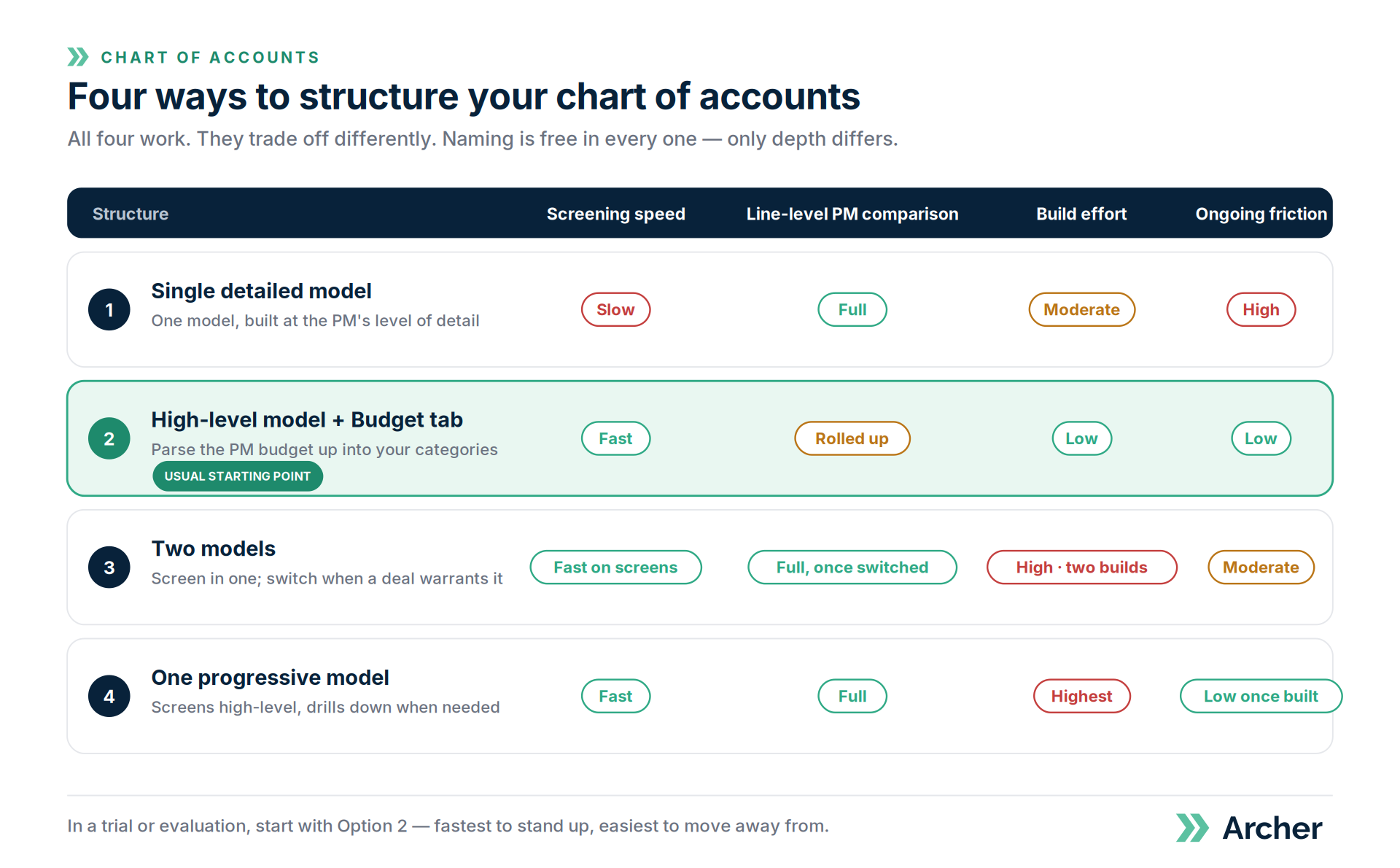
| Screening speed | Line-level PM comparison | Build effort | Ongoing friction | |
|---|---|---|---|---|
| 1. Single detailed model | Slow | Full | Moderate | High |
| 2. High-level model + Budget tab | Fast | Rolled up to your categories | Low | Low |
| 3. Two models | Fast on screens | Full, once switched | High (two builds) | Moderate |
| 4. One progressive model | Fast | Full | Highest | Low once built |
Option 1 — One model at your PM's level of detail
One model, built to the granularity your property manager uses. Every assumption lives in it from the first screen onward.
What you get. Budgets flow in 1:1. One model, one chart, one source of truth. Full line-level comparison against the PM's own categories.
What it costs. Every deal you parse pays the granularity cost — including the ones that never reach a PM. Instead of confirming that a block of rows belongs in Repairs & Maintenance, someone picks the right sub-bucket for each row, one at a time. Accuracy on ambiguous rows drops, because many statements don't distinguish their own sub-categories (see Why some line items are hard to map). And benchmarks built on those granular buckets are less reliable than the aggregate.
Best fit. Teams that send most of what they underwrite to a PM, and work from a single, consistent PM chart. The cost only bites when you screen many to close few.
Option 2 — Keep your model high-level and parse the PM budget into it
The point most people miss: you don't need a granular model to consume a granular budget. The budget is just another document. Archer parses it and rolls their lines — office supplies, answering service, office internet — up into your categories, like Administrative Expenses. This is what the Budget tab does.
What you get. Screening stays fast. An accurate Year 1 from the PM's actual numbers, expressed at your level. Consistent benchmarking across every deal because every deal is coded the same way. One model. The fastest of the four to stand up.
What it costs. You compare at your category level, not theirs. You can reconcile their Admin total against yours; you can't argue about office supplies specifically.
Best fit. Teams that screen materially more than they close, and whose real requirement is that the budget lands accurately rather than line-by-line. That's most teams — which is why this is our usual starting recommendation.
Option 3 — Two models
A high-level model for every screen, and a detailed model you switch to once a deal warrants a PM budget.
What you get. Fast screening and full granularity on the deals that earn it. Each model stays simple.
What it costs. Typed assumptions don't travel. Renovation scope, loan timing, anything your team entered by hand rather than parsed has to be re-entered in the detailed model — at the worst moment, when the deal is live. Two builds up front, two models to maintain, and someone has to remember which model a deal lives in. And when your IRR moves between the two, you're reconciling instead of underwriting.
Best fit. Teams whose models are mostly parse-driven, so there's little to port.
Option 4 — One model that starts high-level and drills down
A single model that screens high-level and expands into detail when you need it.
What you get. Fast screening and full detail in one place. No switching, no porting. The lowest per-deal friction once built. One source of truth from first screen through asset management.
What it costs. The largest build and the most complex formulas. Supporting two levels of detail in one workbook makes the logic much harder to trace, share, and modify. Heaviest ongoing maintenance. Longest time to value — which matters most during a trial.
Best fit. Teams with real volume, a genuine need for both levels, and the appetite to invest up front to remove friction permanently.
How to choose
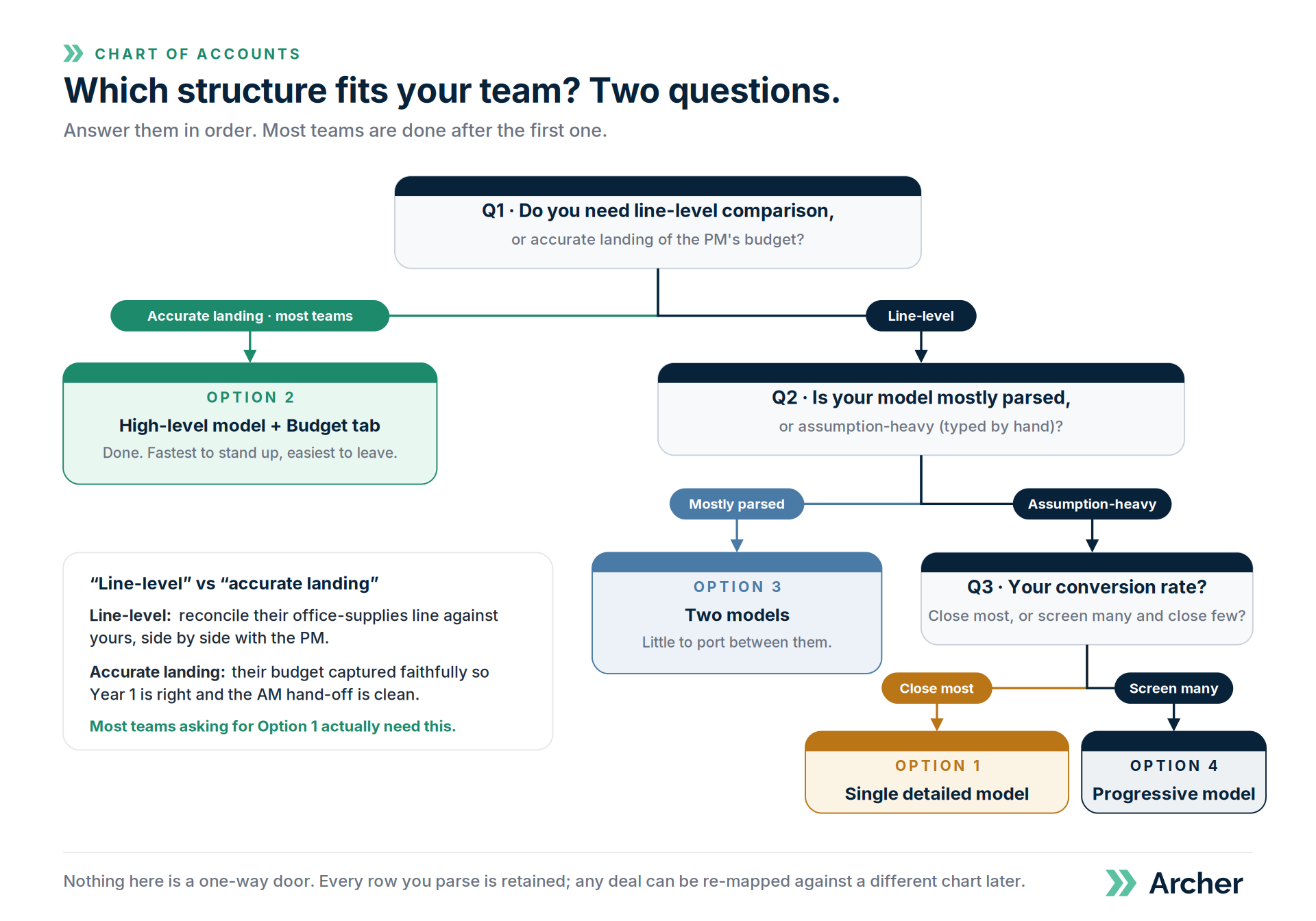
Two questions settle most of it. Answer them in order.
Question 1 — Do you need line-level comparison, or accurate landing?
These sound alike and aren't.
- Line-level comparison: you need to sit next to the PM and reconcile their office-supplies line against yours.
- Accurate landing: you need their budget captured faithfully so Year 1 is right and the asset-management hand-off is clean.
If the honest answer is accurate landing, Option 2 gives you everything you asked for at none of the cost, and you're done. Most teams who ask for Option 1 actually need Option 2 — the requirement was never to argue about office supplies, it was to make sure the budget was right.
Question 2 — If you do need line-level, how much of your model is typed rather than parsed?
- Mostly parsed → Option 3 is cheap. Little to port.
- Assumption-heavy → Option 3 will frustrate you. Choose Option 1 if your conversion rate is high, or Option 4 if you screen far more than you close and want to invest in the model.
A third question if you're still weighing Option 1: how consistent is the source? One PM sending statements on a chart you helped define is very different from a dozen managers with a dozen conventions. The more control you have over how the statement is written, the more granularity you can support.
If you're in a trial
Start with Option 2. It's the fastest to stand up and the easiest to move away from. Nothing here is a one-way door — every row of every document you parse is retained, so any deal can be re-mapped against a different chart later with Refresh Data. Choosing Option 2 now doesn't forfeit the granular path. It just declines to pay for it before you know you need it.
Related
- Upload a Year 1 budget with the Budget tab → https://www.help.archer.re/budget-tab-year-1-budget
- Choosing your COA strategy → https://www.help.archer.re/coa-strategy-simple-vs-detailed
- Which line items should I break out? → https://www.help.archer.re/coa-turn-it-on-test
- Custom COA mapping → https://www.help.archer.re/custom-coa-mapping
- Bring Your Own Model → https://www.help.archer.re/how-to-use-byom-bring-your-own-model