![logo-green.png]](https://www.help.archer.re/hs-fs/hubfs/logo-green.png?height=40&name=logo-green.png)
Once a deal gets serious, a real budget shows up. Your property manager — or your own asset management team — sends over a Year 1 operating budget with 10–15 admin lines, 15 other-income categories, and a GL structure that looks nothing like your acquisitions model.
Previously you had two bad options: rebuild your model at their level of detail, or reconcile it by hand. The Budget tab removes both. You upload the budget, Archer parses it the way it parses any T12, rolls their lines up into your categories, and pushes the result into Year 1 of your Proforma.
Who this is for
The Budget tab is available in the Archer Advanced Model as of August 31, 2026.
| Model | Budget tab |
|---|---|
| Archer Advanced (monthly, 3-year proforma) | Included |
| Archer Starter+ (your adapted Starter model) | Can be added on request — email support@archer.re |
| Archer Starter (annual) | Not supported |
Not sure which model you're on? Click your name (top right) → Settings → Models.
How it works
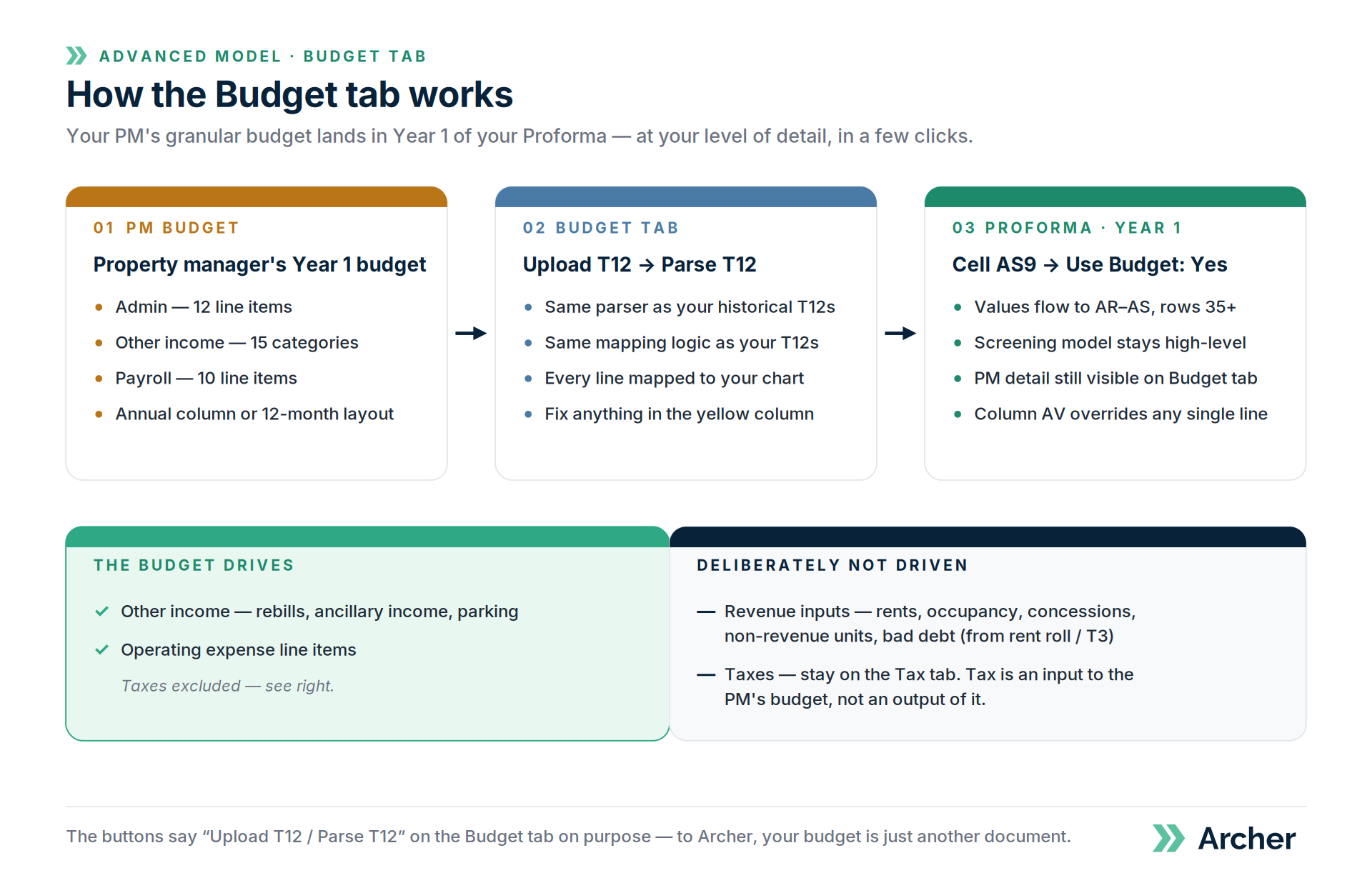
- Open your underwrite in Excel and go to the Budget tab.
- On the Archer ribbon, click Upload T12 and select the budget file from your PM or in-house team.
- Click the blue Parse T12 button.
Yes, the buttons say T12. That's intentional — the Budget tab uses the same parser and the same mapping logic as your historical T12s, so there's nothing new to learn. Your budget is just another document.
The parser accepts either format:
- A single column of annual values, or
- A 12-column monthly budget laid out like a T12 (row descriptions, one column per month)
Archer extracts every line and maps it to your acquisitions chart of accounts automatically. Review the mapping the same way you review a T12: the yellow dropdown column is where you fix anything the system got wrong, and every correction trains your account.
What happens on the Proforma tab
A toggle in cell AS9 watches for a budget upload. When it detects one, it flips to Use Budget: Yes, and the mapped budget values flow into columns AR–AS, rows 35 and down.
The budget drives some lines and deliberately leaves others alone.
Budget drives
- Other income — rebills, ancillary income, parking
- Operating expense line items (taxes excluded)
Budget does not drive
- Revenue inputs — market rents, occupancy forecast, concessions, non-revenue units, and bad debt continue to come from your rent roll and T3 assumptions
- Taxes — these continue to pull from the Tax tab
Why exclude taxes? Because detailed tax assumptions are almost always an input to the PM's budget, not an output of it. Your tax work stays the source of truth; the budget doesn't get to overwrite it.
Override any single line
The controls in AV36:AV100 still let you choose the data source for each line individually. Want the budget for everything except management fees? Toggle that one line in column AV back to your baseline. AS9 sets the default; column AV is the escape hatch.
Why we built it this way
The problem the Budget tab solves is a granularity mismatch, and the fix is not to make your model more granular.
A typical acquisitions team screens 50 deals. Their model stays high-level, so mapping T12s across all 50 is fast, and they pass on 45 while keeping every row of data. The 5 that survive go to a PM for a real budget. That budget now lands in the underwrite in a few clicks — at your level of detail, with the PM's granular lines still visible on the Budget tab if you need to see what's inside "Payroll."
Screen wide and cheap. Go deep only where it pays.
Related
- Four ways to structure your chart of accounts → https://www.help.archer.re/four-ways-to-structure-your-chart-of-accounts
- Choosing your COA strategy → https://www.help.archer.re/coa-strategy-simple-vs-detailed
- Understanding your Excel model tabs → https://www.help.archer.re/understanding-excel-model-tabs
- Common T12 parsing issues → https://www.help.archer.re/common-t12-parsing-issues-and-quick-fixes